Webflow Pricing Changes 2026: Premium plan, Team plan, and AI credits explained




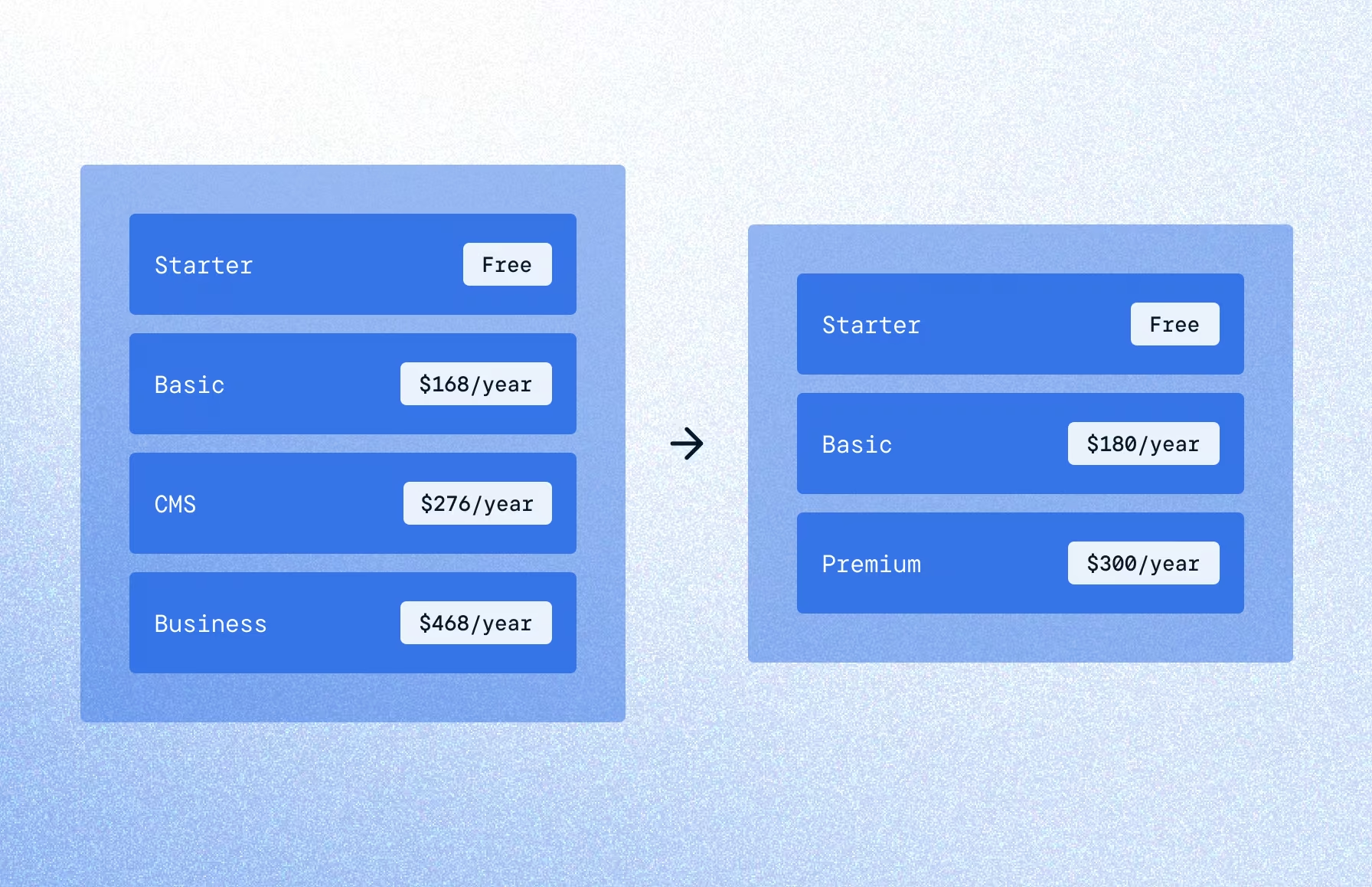
Webflow's May 2026 pricing update merges CMS and Business into a new Premium plan, adds a Team tier, and bundles AI credits.
Webflow announced on May 13, 2026 that it's simplifying its plan lineup and updating prices across the board. CMS and Business Site plans are merging into a single new plan called Premium. There's also a new Team plan for fast-growing marketing teams, AI credits bundled into every Workspace, and a small price change on the Basic plan.
For most B2B marketing sites, this is a net win. Pricing gets simpler, CMS limits go way up, and the line between "I have a marketing site" and "I have a content operation" doesn't require a plan change anymore. But there are timing nuances that matter, especially if you're on monthly billing or managing client sites under an agency Workspace.
Here's what changed, when it takes effect, and what to do about it. See Webflow's full announcement here.
What is Webflow's Premium plan?
The biggest update is that Webflow took the two most common Site plans for B2B marketing sites (CMS at $23/month and Business at $39/month) and consolidated them into one tier.
Premium gives you 20,000 CMS items, 40 CMS Collections, 50GB bandwidth, 300 static pages, form file upload, well-known files support, and faster search indexing. Pricing lands at $25/month on an annual plan, or $39/month on a monthly plan. The full feature list is on the Webflow pricing page.
If you're on the CMS plan today
You're getting a small price bump from $23 to $25/month (billed annually – gotta love those "gotcha" numbers), but you're getting a lot more in return. Static page count doubles. CMS limits go from 2,000 items to 20,000. Form file upload, well-known files, and faster search indexing are unlocked. $24 more per year, but way more functionality.
If you're on the Business plan today
You're saving $14/month ($39 to $25 annual). The tradeoff: included bandwidth drops from 100GB to 50GB. For small teams and small marketing sites, 50GB is usually enough. If you're running heavy video, ungated downloads, or seeing real traffic (10s of thousands of hits monthly or more), you may need a bandwidth add-on. Not sure? Try pulling your last 90 days of bandwidth usage from your site settings to doublecheck.
CMS, Business, and Premium side by side
The Basic plan gets minor changes
If you're on Basic, here's what's different:
- Annual pricing: $14 to $15/month
- Monthly pricing: $18 to $25/month (this one is sharper)
- Static page count doubles from 150 to 300
The monthly-to-annual delta is now $10/month, which is the strongest argument for moving any monthly-billed Basic site to annual before the cutoff.
What's the new Webflow Team plan?
Webflow added a third tier between self-serve and Enterprise that didn't exist before. It's called Team, and it's built for fast-growing marketing teams that have outgrown self-serve features but aren't ready for a full Enterprise contract.
Pricing is $2,500/month with an annual contract. The plan bundles one Site with 100 CMS Collections, 10 seats (5 full and 5 limited), Localization, AEO agents, publishing workflows, page branching, single-page publishing, site activity log, custom SSL certificates, security headers, up to 30TB bandwidth, and 24/7 priority support.
.avif)
The features that previously required Enterprise (AEO agents, page branching, publishing workflows, single-page publishing) are now reachable without a custom contract. For a B2B marketing team running content ops at scale, this is solid, and what teams like Crew have been asking Webflow for.
AI credits are now included in every Workspace
Webflow introduced a credit-based system for its AI features and bundled credit allocations into every Workspace plan. This is a structural change to how AI usage gets metered.
Here's how the allocations break down:
Credits reset monthly for self-serve plans and annually for Team and Enterprise plans. Webflow is not enforcing credit limits until June 29, 2026, which gives every team about six weeks to see what their actual usage looks like before anything kicks in. Credit add-ons will be available starting on the same date.
You can track usage in the new AI usage dashboard inside Webflow.
When does the Webflow pricing update take effect?
Different sites hit different cutoff dates depending on how they're managed and billed.
- New Site plan purchases: new pricing applies today, May 13, 2026
- Existing sites on standard Workspaces: changes hit at your next renewal or on June 29, 2026, whichever comes first
- Existing sites in Freelancer or Agency Workspaces, or on legacy pricing: changes hit at your next renewal or on November 16, 2026
If you're on monthly billing today, you can switch to annual before your cutoff to lock in your current plan pricing for another year. That's a real lever if you're on Business and don't want the bandwidth tradeoff, or if you're on Basic and want to dodge the monthly jump.
What do I need to do now?
If you're on CMS: No action required. You'll be upgraded automatically and the price bump is small. If you want to lock in $23/month for another year, switch to annual billing before your cutoff.
If you're on Business: Pull your bandwidth usage. If you're consistently under 50GB, you'll save money. If you run heavier (video, high traffic, gated downloads), plan for a bandwidth add-on, or lock in your current $39/month annual rate by switching to yearly billing.
If you're on Basic monthly: Move to annual billing before your cutoff to save a few dollars. The monthly jump from $18 to $25 is a bit steeper.
If you're outgrowing self-serve: Look at Team before stitching together a Workspace plan plus add-ons. Definitely worth considering if you need Localization, AEO agents, or governance features like page branching and activity logs (these are more useful than you think, and we get requests for page branching and activity logs all the time).
If you're an agency or freelancer managing client sites: Your portfolio has until November 16, 2026. Use the time to audit client accounts, surface bandwidth-heavy sites on Business, and have proactive conversations. We typically don't own client sites at Crew, but some agencies run their accounts this way and upcharge for hosting.
What this means for B2B marketing teams
These updates seem promising, and I'm glad Webflow's moving towards more flexible plans and unlocking Enterprise features. Most B2B marketing sites land in better shape after this update than before it. The CMS plan was always slightly underpowered for content-heavy SaaS sites, and the Business plan was overkill for some, but the new Premium plan splits the difference at a reasonable price.
A couple takeaways from all of this:
AI credits are now infrastructure. Webflow is positioning AI usage the way it positions bandwidth: a metered resource bundled into your plan. Expect more AI-native features to follow this pricing model.
AEO is moving down-market. AEO agents were Enterprise-only at first. Now they're on the Team plan. That tracks with where search is heading, and Webflow is betting that mid-market teams want AI search visibility too.
The Team plan is a good option for small enterprise and growth-stage teams. The new Team plan offerings (publishing workflows, page branching, activity log, Localization, AEO) are all previously Enterprise-only. We have client partners that have been asking for these for years, but couldn't previously justify the cost of full Enterprise plans.
How Crew helps clients navigate Webflow changes
We design, build, and grow Webflow sites for B2B marketing teams. When Webflow changes its plans, pricing, or feature mix, we audit our clients' accounts, and help navigate the transition.
If you want help reviewing your Webflow account before the cutoff, or if you're weighing the Team plan against your current setup, get in touch.
Have questions about Webflow's 2026 pricing updates?
Is the Webflow CMS plan going away?
Yes. The CMS plan is being merged into the new Premium plan, along with the Business plan. Existing CMS sites will be automatically migrated.
How much is the new Webflow Premium plan?
$25/month on an annual plan, or $39/month on a monthly plan.
What's the difference between the Webflow Premium and Team plans?
Premium is a Site plan ($300/year) for individual marketing sites. Team is an all-in-one offering ($30,000/year) that bundles a Site, 10 seats, Localization, AEO agents, and Enterprise-style governance features into the contract.
Will my existing Webflow Business plan price change?
Yes. You'll be migrated to the new Premium plan at $300/year, but included bandwidth drops from 100GB to 50GB monthly. You can lock in your current Business plan for another year by switching to annual billing before your cutoff.
When do Webflow's 2026 pricing changes take effect?
For new sites, today (May 13, 2026). For existing sites on standard Workspaces, June 29, 2026 or your next renewal, whichever comes first. For sites managed under Freelancer or Agency Workspaces, November 16, 2026 or your next renewal.
Do I have to upgrade to the Team plan?
No. The Team plan is a new option for growth-stage and small enterprise teams. It's designed for teams that have outgrown self-serve features but aren't necessarily ready for Enterprise.
How do Webflow AI credits work?
Every Workspace plan now includes a monthly (or annual, for Team and Enterprise) allocation of AI credits used by Webflow AI features.
Can I lock in my current Webflow pricing?
Yes. If you're on monthly billing, switch to annual before your cutoff date to keep your current plan pricing for another year.
More about Webflow and agencies
We could talk about this stuff all day. In fact, why not book a call with us and we can continue this over coffee?
Why does Crew recommend Webflow for B2B marketing sites?
Webflow gives marketing teams direct control over their site without waiting on developers for every update. It's fast, flexible, and produces clean code that performs well for SEO and AI discovery. The visual CMS, component system, and native hosting mean you get a site that's easy to scale, easy to manage, and easy to keep fast. For B2B marketing sites specifically, it's the best platform we've worked on.
What is a Webflow Premium Partner and does it matter?
Webflow Premium Partner is the highest tier in Webflow's agency partner program. It means we've demonstrated deep expertise across design, development, and CMS architecture through a track record of successful projects. In practical terms, it means we get early access to new Webflow features, direct support from Webflow's team, and a level of platform knowledge that comes from building on it consistently at scale.
Do you work with Webflow Enterprise, Localization, or Optimize?
Yes to all three. We've built on Webflow Enterprise for clients who need advanced security, publishing controls, and SLAs. We use Webflow Localize for multi-language sites and Webflow Optimize for A/B testing and personalization. These are native Webflow features we work with regularly, not add-ons we're learning on the fly.
What should I look for in a Webflow agency?
Look for a team that treats Webflow as a growth platform, and leverages all of its capabilities. That means they should understand CMS architecture, performance, SEO, accessibility, and integrations, not just visual design. Check whether they're a Webflow Partner (we're an Enterprise Premium Partner), whether they handle strategy and copy or just execute, and whether they stick around after launch to help you optimize.